AI agents forget. kontexta remembers.

Persistent context, governed execution, and cross-agent continuity for Claude Code, Cursor, Aider, Cline, Continue, Gemini, OpenClaw, and more.

  • Local-first
  • No cloud
  • Your machine, your data
  • Apache-2.0
Avg Token Savings
73%
Context Efficiency
4x
Data Privacy
100% Local
Supported Agents
8+
kontexta MCP server score

The Context Gap

Without Kontexta

AI coding agents are stateless by default. Every new session loses architectural decisions, prior debugging context, operational conventions, and execution history.

The Result

Teams compensate with bloated CONTEXT.md files that dump everything into the context window on load (consuming massive tokens), get locked into vendor-specific memories, or waste time on repetitive re-explanation when switching agents.

With Kontexta

Kontexta turns agent context into a persistent, local-first system. Instead of blindly loading whole files, it surgically fetches only the specific context needed, drastically reducing token consumption.

The Handoff

Claude Code solves a bug and automatically journals it. Cursor reads the journal and picks up exactly where Claude left off. Zero re-explanation.

Unmatched Context Efficiency

Dumping entire codebases into your AI's context window is expensive and degrades response quality. Kontexta's MCP server retrieves only the precise files needed.

Average Savings
72.8%
Fewer tokens consumed per task
Efficiency
4x
More context budget for reasoning
Precision
Surgical
Read specific files & markdown sections

Real-world Developer Scenarios

ScenarioNaive TokensKontexta TokensReduction
Implement master-password authentication
Add a secure login system with session cookies, IP bypass rules, and protected API routes.
17,8636,35964.4%
Add a new REST API endpoint
Create a new API route following the existing project conventions (auth, DB, validation).
7,9792,61567.2%
Debug WebSocket reconnection logic
Investigate why WebSocket disconnects and fix the reconnection / auth handling.
9,8842,19177.8%
Understand the database schema & migrations
A new contributor wants to understand how the SQLite schema evolves across migrations.
9,5851,74281.8%
Measured using cl100k_base (GPT-4 / gpt-tokenizer)

Brain → Hands → Eyes

A closed feedback loop that turns observation into durable knowledge.

Brain → Hands → Eyes architecture
01

Brain

The context engine.

Git-backed markdown vault with FTS5 search, surgical section edits, and token-aware reads.

02

Hands

Governed execution.

Sandboxed, project-defined commands declared in kontexta.json with optional human approval.

03

Eyes

Automatic feedback loop.

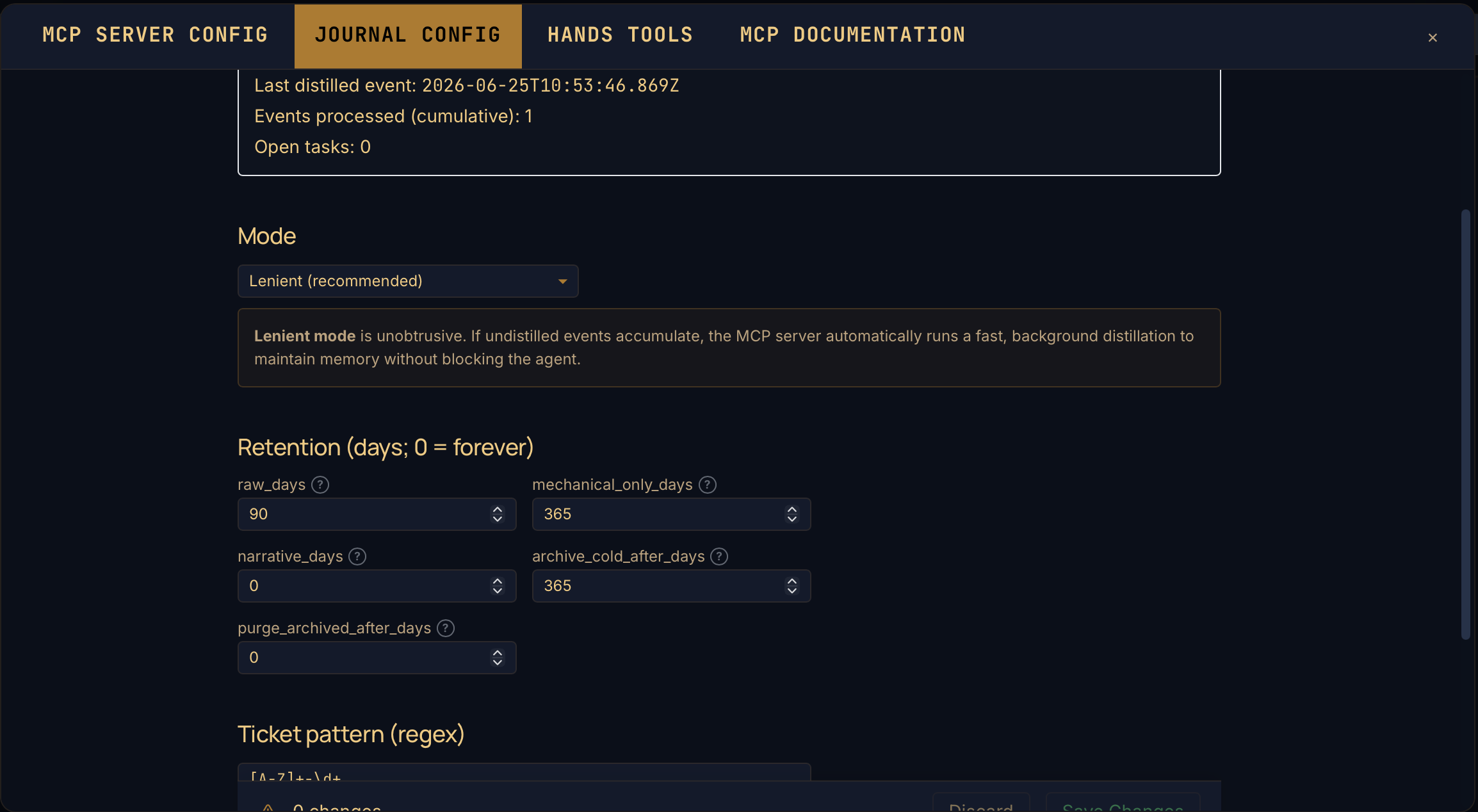
Every MCP tool call is captured to a per-project event log without agent involvement. Periodic distillation turns raw events into per-topic markdown summaries indexed alongside the vault.

Product in Action

CORE FEATURE 013
kontexta.app/dashboard
Interactive Dashboard
Hand Creation
Git Persistence & History

Interactive Dashboard

Manage your agent's memory with a powerful, local-first web interface. Select projects, browse indexed context files, and inspect the Brain in real-time.

Hand Creation

Define powerful, governed agent capabilities using the Hands builder. Use the Template Gallery to quickly add standard tools or create custom, project-specific commands.

Git Persistence & History

Synchronize your context across devices with two-way Git integration. Track changes with granular version history (Time Travel) and restore previous states directly from the dashboard.

Explore 16+ More Powerful Developer Features

Vault ManagementLocal-first knowledge
Agent JournalingDistilled summaries
MCP ConnectorUniversal API integration
SQLite FTS5Zero-hallucination search
Markdown StudioNative MD editing
Mermaid VisualsMMD diagram rendering
Zero-Trust PrivacyLocal-only security
Clipping EngineInstant web docs

Why kontexta

Cross-agent continuity

Switch from Claude Code to Aider or Continue mid-project. Both read the same vault and journal back into it.

Automatic memory

Every tool call is captured server-side without agent involvement. Periodic distillation turns the raw event log into per-topic markdown summaries you can search, share, and version.

Governed execution

Every Hands command is declared in kontexta.json. Approval gates for the destructive ones. No rogue shell.

Deterministic retrieval

SQLite FTS5, not vectors. Exact keyword and regex search — no embedding hallucination, no third-party API.

Context economy

Surgical fetching: outlines, sections, search excerpts. Every response carries est_tokens so agents budget intentionally.

Local-first architecture

Your vault on your SSD. No cloud sync, no upload. KONTEXTA_DATA_DIR points wherever you want.

How kontexta compares

CapabilityCLAUDE.mdVendor memorymem0Zepkontexta
Setup costNone — just a fileNone — built inSDK integration in your appSDK + serviceMCP server + kontexta.json
Cross-agent portabilityPer-agent flavored files drift apartLocked to one vendorApp-level, not agent-levelApp-level, not agent-levelSame MCP surface for Claude Code, Cursor, Gemini, Aider
Retrieval modelWhole file dumped into contextWhole file / vendor-managedVector + graph (semantic)Temporal knowledge graphDeterministic FTS5 + regex; surgical section reads
Token accountingNoneNoneNone exposed to agentNone exposed to agentEvery response carries est_tokens / size_bytes
Command executionN/AVendor-defined toolsN/A (memory only)N/A (memory only)Sandboxed Hands with per-command contracts and approval
StorageRepo file (clutters PRs)Vendor cloudSelf-host or hosted, vector DBSelf-host or hostedLocal SQLite, git-synced markdown vault
Best atStatic project conventionsZero-config personal memorySemantic recall inside one appLong-running conversational memoryMulti-agent handoff + governed local execution

kontexta turns AI agents from isolated chat sessions into a continuous operational system.

Install

Choose your setup. Use Docker or Manual to unlock the full powerhouse of WebUI features.

Docker
Recommended

Persistent vault on a host volume.

Click to view steps →
FULL WEBUI
Manual
Advanced

Clone, build, run. Apache-2.0.

Click to view steps →
FULL WEBUI
npm
Quick Start

No install required — npx fetches and runs.

Click to view steps →

Configuration

Where your agent configuration files reside. Copy and paste these paths to your terminal, or use the Kontexta WebUI for pre-filled setup commands.

Recommended

Setup via WebUI

1

Open WebUI

Access http://localhost:3000 in your browser.

2

Go to Configure

Click Configure in the top bar or navigate directly to /docs.

3

Copy Config

Select MCP SERVER CONFIG, choose your agent, and copy the pre-filled snippet.

Cloud Sync & Remote Backup

Link your knowledge vault to a private git remote via the Sync menu. This enables two-way synchronization, ensuring your project context and agent configurations are securely backed up and shared across all your development environments.

Sync ▾ > Configure Remote
WebUI Navigation
Claude Code

Claude Code

Configuration for Claude Code, including API keys and agent settings.

~/.claude.json
Cursor

Cursor

Cursor's configuration file for agent behavior and workspace settings.

~/.cursor/config.json
Gemini

Gemini

Gemini's configuration file for agent settings and API access.

~/.gemini/config.json
Cline

Cline

Cline's configuration file for agent behavior, model settings, and MCP server integrations.

~/.cline/settings.json
Continue

Continue

Continue.dev uses a JSON configuration file for custom MCP servers and system prompts.

~/.continue/config.json
Antigravity

Antigravity

Configuration for the Antigravity agentic workspace and tool integrations.

~/.gemini/antigravity/
OpenClaw

OpenClaw

OpenClaw's configuration file for agent behavior, model settings, and MCP server definitions under mcp.servers.

~/.openclaw/config.json
Aider

Aider

Aider's configuration file for agent settings, model preferences, and MCP server integrations.

~/.aider.settings.json

The Tool Inventory

A deterministic, governable suite of capabilities for your agents.

Tool Registry

Search
Read
Write
Folders
Tags & favorites
Browse & stats
Git & sync
Journaling
Tool Definition

search

Description

FTS5 keyword search with inline match excerpts and tag/token metadata.

Arguments

query: string (FTS5 query)
project_id: number | null (Filter by project)
tags: string[] (Required tags)

Response Schema

{
  "results": [
    { "id": number, "title": string, "excerpt": string }
  ]
}
Live & Scalable
Kontexta Runtime v2.0.2

Questions & security

The honest answers to the things you should be asking before you point an agent at your codebase.

Where does my data live?

On your machine. By default, data lands at ~/.local/share/kontexta (Linux), ~/Library/Application Support/kontexta (macOS), or %APPDATA%\kontexta (Windows) — no configuration needed. You can override this with KONTEXTA_DATA_DIR. Everything is indexed in a local SQLite database. Nothing is sent to a third-party service — no embeddings API, no telemetry, no cloud sync. Your only outbound traffic is the optional git push to a remote you configure yourself.

How is this different from a vector DB or RAG pipeline?

Kontexta uses SQLite FTS5 for deterministic keyword and regex retrieval — no embeddings, no semantic-similarity guesswork. The same query returns the same results, every time. You also get exact substring/regex search (catches URLs, identifiers, hyphenated terms that tokenisers miss).

How is Hands execution sandboxed?

Hands tools are declared per-project in kontexta.json — agents cannot invent commands. Each invocation runs with no shell interpreter, a locked working directory, and a scrubbed environment (only PATH, HOME, USER, LANG, TZ are forwarded). Output is capped via a ring buffer; timeouts kill the entire process group. Argv parameters are validated by re2 patterns (ReDoS-proof) with an 8 KB UTF-8 cap, and the default pattern blocks leading-dash argv injection.

Does the agent need to remember to log its work?

No. The MCP server wraps every tool registration at boot, so every call writes a per-event line to the project's append-only event log automatically — fsynced per write, redacted for sensitive args, with git branch/commit context attached. Agents can enrich the log with journal_note (decisions) or journal_intent (topic pivots), but the durable capture happens with zero agent involvement. Periodic distillation (manual via distill_journal, or scheduled via the WebUI) turns the raw event log into per-topic markdown summaries indexed in the same FTS5 surface as the rest of the vault.

Can I require human approval before destructive commands run?

Yes. Mark a Hands tool as confirm-required and it returns a single-use, CSPRNG-bound token that expires in 60 seconds. The agent must call confirm_hand with that token to actually execute — the token is the auth, and it cannot be replayed.

What stops a malicious URL from hitting my internal network?

The URL clipper performs DNS resolution and rejects every resolved address against a blocklist: loopback, private IPv4/IPv6, link-local, CGNAT, multicast, IPv4-mapped IPv6, and special hostnames (localhost, *.local, *.internal, *.lan). Cloud-metadata endpoints like 169.254.169.254 are blocked. Redirects are followed manually with per-hop re-validation (max 5 hops), so a public URL that 302s into the metadata service is still refused. Response bodies are streamed with a 10 MiB ceiling.

How are file-system operations protected?

Every path is checked with assertPathInside before read or write — files cannot escape their project root or KB base. move_file validates both source and destination containment. Symlinks are skipped (lstatSync) so a loop under your vault cannot recurse forever. Writes are atomic (tmp file + rename) so a crash mid-write cannot corrupt a file. Download responses strip CR/LF from filenames and use RFC 5987 encoding to block HTTP response splitting.

What about secrets in error messages or git output?

Git error output is run through redactCredentials() before logging or returning to clients — user:pass@ patterns in URLs are stripped. Hands output is similarly capped and bounded so a runaway process cannot leak via log volume.

Does it work offline?

Fully. The MCP server, the web UI, and the SQLite index are all local. Git push for backup is optional and the only operation that touches the network.

Which agents work with kontexta?

Anything that speaks MCP: Claude Code, Cursor, Gemini CLI, Codex, Continue, Antigravity, Claude Desktop, Aider, Cline, and OpenClaw. The onboard_agent tool auto-detects and writes the right context file (CLAUDE.md, AGENTS.md, GEMINI.md, .cursor/rules/*, .continue/rules/*, .aider/kontexta.md, .cline/kontexta.md, .openclaw/kontexta.md) so agents pick up the workflow automatically.

What's the license?

Apache-2.0. Use it commercially, fork it, embed it. No telemetry callback, no rug pull.

How do I configure kontexta for OpenClaw?

Add the Kontexta MCP server to your OpenClaw configuration. For a local Kontexta instance, configure OpenClaw to connect via stdio with command openclaw and args ["mcp", "serve", ...]. For a remote Gateway, use openclaw mcp serve --url wss://gateway-host:18789 --token-file ~/.openclaw/gateway.token. OpenClaw also supports file-based context via .openclaw/kontexta.md.

Get it where you live